 Omid Farhang
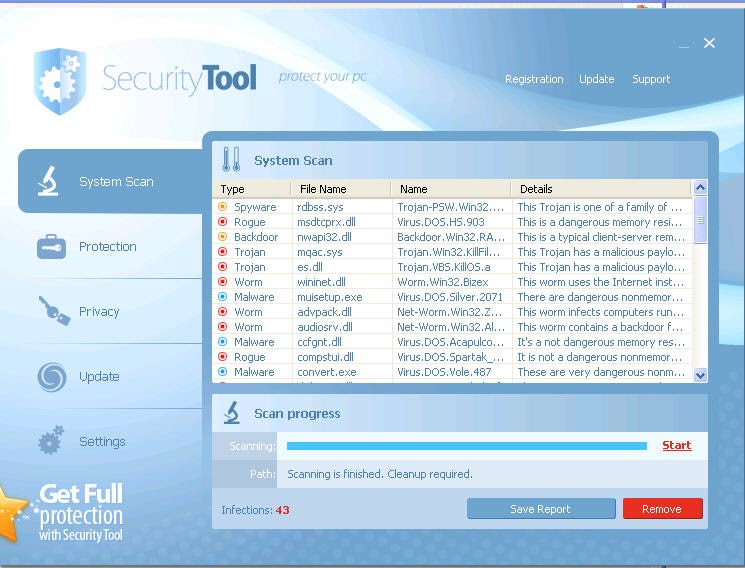
SecurityTool is rogue antivirus software — a scareware scam built to take money, not to protect a PC. It belongs to the same late-2000s wave of fake “security suites” that flooded Windows desktops with false positives and purchase prompts.
Symptoms
If a machine is infected you typically see continuous pop-ups and system warnings claiming the PC is infected, urging you to buy SecurityTool. Those alerts are false. Paying does not clean infections or prevent new ones; SecurityTool is the infection.
It also tends to run a “scan” at Windows startup and show a long list of fabricated threats — again to push the purchase.
What to do
Do not buy SecurityTool. Follow the Malware Removal guide for Windows, then change passwords used on that machine. Field note when the operators kept renaming domains: SecurityTool rogue is trying to be a moving target.
Known System Changes
Created Files
%Desktop%Security Tool.lnk%StartMenu%Programs\Security Tool
Created Folders
%CommonPrograms%SecurityTool%ApplicationData%[randomnamedfolder]
Registry Entries
- Key:
HKEY_CURRENT_USER\Software\Security Tool - Data:
C:\Documents and Settings\%userprofile%\Application Data\[randomnumber]\[randomnumber].bat - Key:
HKEY_LOCAL_MACHINE\SOFTWARE\Microsoft\Windows\CurrentVersion\Run - Value:
[randomnumber] - Data:
C:\DOCUME~1\ALLUSE~1\APPLIC~1\[randomnumber]\[randomnumber].exe
Related scareware
Same era, similar playbook:
- WiniGuard and its clones (IGuardPC)
- SafetyAntiSpyware
- Advanced Virus Remover
- Data Doctor 2010